Emberville

Emberville recycling and armor crafting — September preview

The quick answer

At the September preview’s available workstation, recycling a quality tier targets all inventory items of that quality. Confirm only after checking what to keep, collect materials, then craft and collect an available armor recipe.

September 2026 PC Prologue preview, build number unknown. Based on recorded gameplay, not our playtest; not verified for the October Demo or Early Access.

Start at an available workstation

This procedure begins after reaching the September preview’s workstation room. The armor menu already lists recipes before the player has enough ingredients. Missing ingredients are different from a recipe that has not been unlocked.
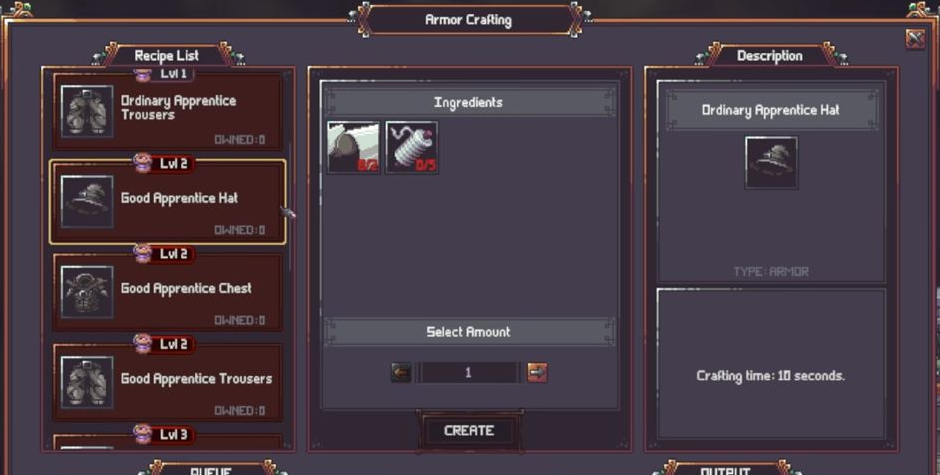
Armor Crafting menu with an existing recipe and ingredient requirements
The armor recipe is already listed; missing ingredients do not mean it has not been unlocked.
Open image ↗
Armor Crafting menu with an existing recipe and ingredient requirements
The armor recipe is already listed; missing ingredients do not mean it has not been unlocked.

Check before recycling

  1. Open the Recycling Station and decide which equipment you want to keep.
  2. Read the quality button’s meaning: the Ordinary option targets all Ordinary inventory items.
  3. Read the confirmation, which again says all ORDINARY items from the inventory.
  4. Use Recycle only if that selection is intended, or Cancel to back out.
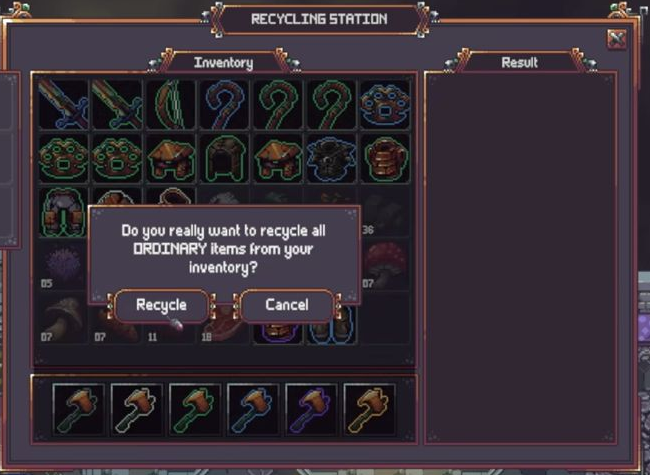
Recycling confirmation for all ORDINARY inventory items
The confirmation warns that every ORDINARY item in the inventory will be recycled.
Open image ↗
Recycling confirmation for all ORDINARY inventory items
The confirmation warns that every ORDINARY item in the inventory will be recycled.

This is a batch action by quality, rather than evidence that clicking the button recycles only one highlighted item.

Craft armor from the available recipe

Collect the resulting materials, then return to Armor Crafting. Select the available Apprentice Trousers recipe, check the required ingredients and quantity, and use CREATE.

Close the menu while the workstation’s crafting indicator completes. Interact with the workstation to collect the finished item.

Confirm the result

The demonstrated pickup reads Collected Good Apprentice Trousers; the item is then visible in the inventory and the recipe’s owned count becomes one.
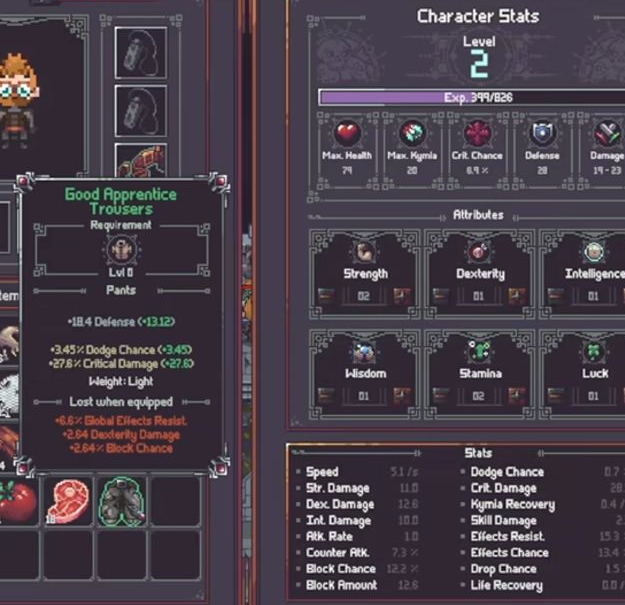
Inventory showing the crafted Good Apprentice Trousers
The demonstrated result is Good Apprentice Trousers. This single result does not guarantee that quality.
Open image ↗
Inventory showing the crafted Good Apprentice Trousers
The demonstrated result is Good Apprentice Trousers. This single result does not guarantee that quality.

That single Good-quality result does not guarantee that every craft has the same quality. This procedure does not establish the workstation’s first unlock, a complete recipe database or October-build behavior.

Search