Before you begin
This guide starts after reaching an available campfire, with meat in the inventory. It does not establish the campfire’s first unlock or require an Adeos rescue before cooking.
Choose the recipe and quantity
- Interact with the campfire to open its menu.
- Select the available Roasted Meat recipe.
- Check the ingredient display and Select Amount control.
- Choose a quantity your ingredients can cover, then use CREATE.
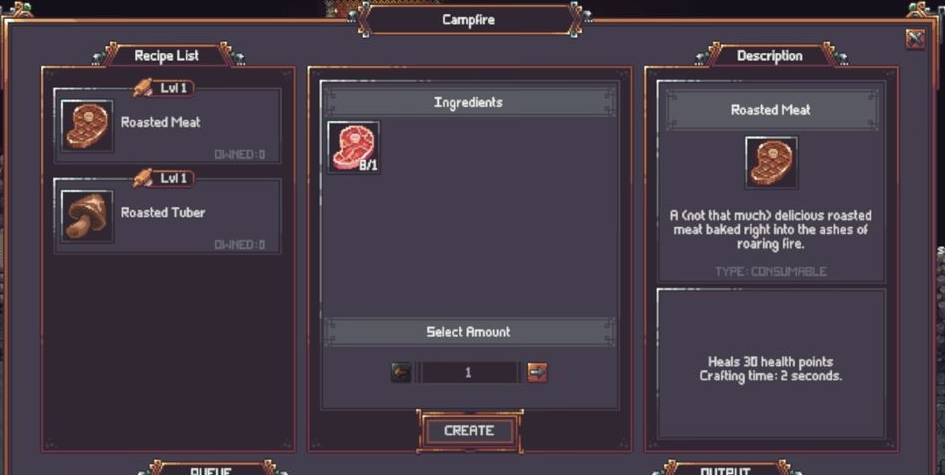
The recording shows a quantity of five with an ingredient display of 13/5. After the action, it shows 8/1, the amount control returns to one, and the queue and output contain food. These are the demonstrated interface states, rather than a universal starting inventory.
Queue is different from output
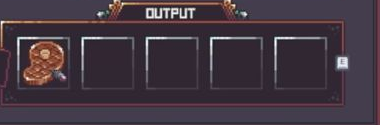
QUEUE shows work in progress. OUTPUT holds finished food. The completed item is not established merely by a tutorial animation or by selecting a recipe.
Collect the finished food
Close the menu, approach the campfire and use the displayed interaction prompt to collect finished food. The demonstrated collection produces a Collected Roasted Meat (3) message.
That three is the quantity in this particular collection message, not evidence that the recipe always yields three items. This is a September-preview procedure at an already available campfire; it does not verify October build behavior or the complete crafting unlock chain.